
The official method to convert dynamic disks back to basic disks is to back up the data, format the disks, and finally restore the data from backup. See Microsoft’s instructions on how to do that here.
Of course, nobody wants to do that, and sometimes it’s not even possible to implement this method. It assumes that you can boot up the computer or at least access the drives and back up the data in the first place. So what are the other options?
Well, I unfortunately had to look for another solution last week when my computer refused to recognize any of my 4 dynamic hard drives. Here are the results of my search:
1. Use TestDisk. If you want to know why and how, keep reading or jump to the conclusion section.
2. If you are lucky enough to be able to boot, follow Microsoft’s own instructions to avoid the backup/format/restore method.
Note: Ignore the title of this knowledge base article and go straight to the WORKAROUND section.
Detailed instructions with screen shots can be found on thelazyadmin.com blog.
3. If your computer won’t boot, read on.
After installing the free VMWare server 1.0.2 and loading Vista Ultimate Edition as a virtual machine on my Windows XP Pro machine, my computer wouldn’t boot in any mode. Last Know Good Configuration didn’t change anything, and a repair install was not an option as neither Setup nor the recovery console were able to detect the Windows installation. Running the map command from the recovery console listed all my drives but they all had question marks instead of the expected drive letters. bootcfg /scan didn’t find anything. ERD Commander couldn’t help either (no Windows installation detected). I wasn’t even able to mount the drives using a Linux live CD.
My next step was to buy an external enclosure for my SATA drives (Vantec NexStar 3, works great) to backup the data from a working computer. When dynamic disks are connected to a computer running XP or Vista, they show up as Foreign in the Disk Management console (diskmgmt.msc). All you have to do is right-click the drive and select Import Foreign Disk. Except this time it didn’t work, and instead I received 2 error messages back to back:
INTERNAL Error – The disk group contains no valid configurations copies (C10000B6)
followed by
Unspecified error (80004005)
Looking up these error messages didn’t lead to anything useful so I decided to give up on the dynamic disk to basic disk conversion topic and started to search for data recovery software. That’s how I found TestDisk.
I ran TestDisk on a XP Pro laptop, it detected my USB-connected “foreign” drive, found all my “partitions” (dynamic disk volumes), allowed me to backup my data to the laptop, and offered the option to write a new partition table based on what it had found. I did just that, securely removed the USB enclosure, plugged it back and voila! My laptop detected a new basic disk, with partitions instead of volumes, drive letters, and best of all, all my data intact.
I was then able to reinstall the drive in my computer, repair Windows and from there run TestDisk on the three remaining drives so I can confirm that it works for external (USB) drives, IDE drives and SATA drives.
Conclusion:
TestDisk 6.6 will allow to backup your data and, if you let it rewrite the partition stucture, it will convert your dynamic disk to a basic disk without touching the data.
Run TestDisk:
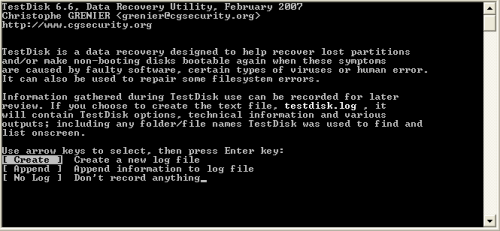
Select Create to log information.

The program detects all the drives connected to your computer (internal, external, Flash drives).
Highlight the one you want to work on, select Proceed and press Enter.
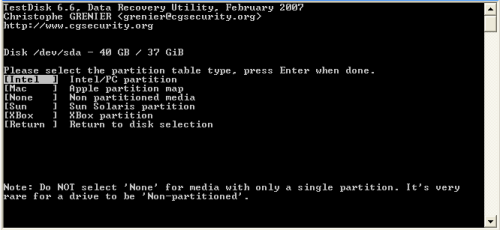
Make the appropriate choice for your computer and press Enter.
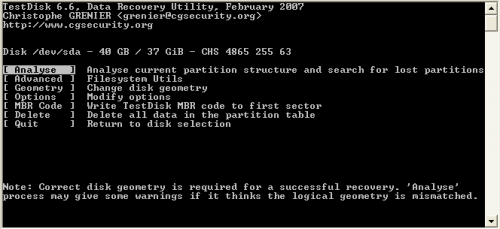
Select Analyse and press Enter.

It displays the current structure. Select Backup first, then Proceed. Backing up first is a good idea if you later want to restore the drive’s partition structure.

It might take a while to get to that screen if your drive is having problems, but eventually, it’ll display all the partitions it found. Select a partition and press P if you want to see the files stored on that particular partition, then press c to copy the files to the folder TestDisk is running from any available drive with enough free space. [Thanks to commenter Bob Janes for pointing out to me that it is indeed possible to backup your data anywhere you wish]
Press Enter to continue.

This is where you can make the dynamic to basic drive conversion happen. Select Write, then press Y to confirm that you want to write the new partition structure to disk.
Quit the program, reboot the drive you just modified and enjoy your new basic drive.


 My PKB
Thank you very much, especially for the screenshots at the bottom.
By the way, the above post smells slightly spammy.
I’m glad you find this post useful, it motivates me to keep posting.
You were right about the other “comment”, I deleted it.
That it the shizzle, just used it to save my ass… downgrade to basic works perfectly! even after I cloned the damaged dynamic disk to another one!!
Good it is work perfet. Thank you for help.
Great stuff! This guide saved my bacon!
The c (copy) function only works with NTFS (not FAT)-formatted disks. Mmm, looks I’ll have to look for another way to backup my defunct external disc….
Any suggestion?
This is what I love about the Internet. A good programmer gives away a nice tool like TestDisk, and then someone else shares their experience using that tool.
I just installed Vista to a new SATA disk and added another PATA disk from my previous WinXP system and came across the “cannot convert dynamic disk” issue.
20 minutes later it’s fixed. A quick Internet search, fantastic instructions for just the solution I’m looking for, a free tool, and voila, I’ve got all my old data.
Thank you very much, mypkb.
Thanks for this – looks like it’s saving my bacon. I have a couple of big NTFS discs that are suddenly showing up as dynamic after a PC rebuild. Trying to recover both partitions on the first of them shows Bad Structure but I am able to copy the files to another drive.
BTW: you do need to have enough free space for a file copy but you don’t need to run TestDisk from that drive. It is possible to navigate the folder tree to another drive using the cursor keys.
Thanks again, Bob
@Bob Janes
Thank you very much for pointing that out. I edited the post accordingly.
I got the same problem.accidentally i converted my 80 gb hdd to dynamic and deleted a partition while trying to recover back to hdd.I tried almost all the softwares(near about 25) available on net.I tried this article too but test disk gave me wrong information that on my dynamic disk have 5 partitions although i have 7 on basic disk that were converted into dynamic disk.
I found only 3 softwares identifying correct partition 1st power data recovery (http://www.eofsoft.com) and Paragon Hard Disk Manager, version 8.5.(Even paragon says that its able to convert dynamic to basic but in my case it was not able but it shown all files and folders in each partition through volume explorer option and i recovered files safely by both softwares).3rd software was r studio.
some other best links i found were
http://thelazyadmin.com/blogs/thelazyadmin/archive/2007/01/17/Converting-Dynamic-Disks-Back-to-Basic-Disks.aspx
http://www.wilderssecurity.com/showthread.php?t=102958&highlight=dynamic+disk
acronis also claims but it dint recognized my dynamic partitions.Only one software left to which i will try in night that is Acronis True Image 9.1.
I spent whole day for this work so friends save ur time by my hard work.I will say thanks to the writer of this nice article which inspired me to write my experience.if any one has other experience do wrte to help other people as time is damm valuable :-))
hi frns me again,there’s one more software that works nicely it mounts all partitions in the dynamic disk its name is Find and Mount.It loads all partitions like basic disc partitions after selecting one by one.
:-)).m downloading Acronis True Image 9.1 and will update u all
Production w2k3 server: Worked perfectly! and on the system disk no less.
Worked like a charm on vista. big big thanks.
Worked perfectly for me, and saved me 1+ days of reinstalling. Thank you!
Works like a f****** dream, its amazing how simple it really was. Plugged in the dynamic drive to an external enclosure, ran the program, followed the screen shots, works like a charm. If you do it properly, you don’t have to copy your information over; once its converted back to a basic disk, your info will still be there 🙂
Stunning. Simply stunning.
Just used it again on another HDD. This program is sexy. I thank you, my good man, for putting this together.
I had a sbs2003 server – upgrade version. Got it booting of the drive ok after a hdd fail. I then thought that I should get a software mirror as the cheap ass raid controller would not create a mirror from an existing disk!!! So I merrily went about converting the disk to dynamic – oh crap the system wont boot and the conversion failed. After a little more reading I assume it is because the client was running an upgrade (which the previous support company applied in the great wisdom to save the client some labour – waannnnkkkeeers)and this is a multi OS boot (I think) and you cannot convert a multi os partition. I am currently copying the data using the data copy facility. I will let you know the result. 🙂 – but I am confident
Cheers Rob
Bought a new 320gb external USB drive for backing up my work & home pcs. It arrived configured as dynamic drive. Rather than convert my other systems to dynamic drives I wanted to convert the new one back to a basic drive. Microsoft’s knowledge base assumes the drive began it’s life as a basic drive so the instructions posted would not work for me.
The TestDisk utility worked exactly as advertised and in about 5 minutes I’ve got exactly what I need….thanks, so much !
even though i was able to use data recovery software to back my data up, i tried this method to convert my disk. Lo and behold, it worked beautifully. Cheers!! Thanks a lot!!
Wow, this is the 4th time i’ve come across this problem, and have somehow magically gotten it to work but this is by FAR the easiest solution.
Thank you (:
Pingback: Can dynamic disk be converted to basic disk? - Page 2 - TechEnclave
I have just received a new laptop. It has a single HDD with XP installed. The drive is dynamic and I want to create second partition for my own data. But unfortunately there is no unallocated space, and Partition Magic and similar are unable to resize the partition (presumably because the drive is dynamic). Can I use TestDisk to convert the drive back to basic without losing my XP install (I don’t have facility to mount the drive in another machine while I do this).
Any ideas anyone?
Thanks.
This guide is… excellent. You are made of win. EPIC WIN.
Thanks man, this worked very well. I will never, ever format to dynamic disk again, not worth it.
Thanks! I looked for quite a while to find a way to read this disk in a USB enclosure on my MAC, and this did it. I was scared and unsure to hit the button, but it worked great with no trouble.
when my 1TB dynamic hd was not recognized in my XP Pro fresh install
i was scared then angry then started to panic
the thing was almost full, my heart sank
YOU HELPED RESURRECT MY DRIVE
i thank you from the bottom of my heart
Hi,
I’ve lost my D partition. XP Setup or Fdisk can not see it. But Dos 6.2 boot disk can see both C and D drives.
testdisk shows the following media:
Disk /dev/sda – 80 GB /74 GiB
Drive D” – 520 MB / 496 MiB
There is this message for D partition:
“Partition sector doesn’t have the endmar 0xAA55”
If I search deeper for partitions, it found three of them, which is correct according to earlier healthy partitions: 1. C partition, 2. D partition 3. 7MB partition for XP OS use.
* HPFS-NTFS 0
D HPFS-NTFS 1
D HPFS-NTFS 732
I get “Bad Structure” error if I choose any options other than D-delete for the 2nd and 3rd item.
Is there any hope in fixing my D drive? How can I fix it. Thanks.
Thank you, you saved my day!
Thanks for the article! Helped me a lot!!!
Worked perfectly 🙂
Hi,
If I choose to write the partition table without saving the data, would it still remove the data as it converts the disk into ‘basic’ ? I need to know this as I dont have a storage to copy the 200 GB of data somewhere else before converting to basic.
Kindly let me know.
Thanks for help,
-Abhi
@Abhi
You do not have to back up the data first.
The method described allows you to convert a dynamic disk to basic without losing data. I chose to back up first “just in case” something bad happened. So it’s up to you.
Thanks pkb. Now, I had two partitions in the disk earlier (when dynamic).
I ran Testdisk on one partition (smaller size one) and converted the disk to basic. It shows very well on Disk Management as basic disk and that volume comes up in explorer as well.
For the other partition (which is the main big one), it now appears as ‘unallocated’ in disk management.
I think I need to run testdisk again on it as well now, right ? Also, when I run it, what should I mark this partition as , P or * (primary or primary bootable). It currently appears as D.
Am sorry if this is a very trivial question !!!
Pingback: System Zero - Web Developers » Archive » How to change your sata drive from Dynamic to Basic in Windows Vista
thank you. with the disk set as dynamic I was unable to have a dual boot scenario with linux. this quickly and safely solved the problem….in 2 minutes.
Thank you!!! Partitioned my drives back to basic. Worked as described. Read / followed the Screenshot directions. Excellent results!!!!!
Thank you so much for posting this. Why can’t Microsoft make it this easy?
Wow, this works perfectly! Managed to convert my dynamic disk to basic disk very quickly. Thanks for recommendig it and for documenting the steps!
Why the hell does Microsoft leave this feature in Windows XP and Vista anyways? It’s not supported. Anyways, saved my (very large) bacon. Thanks for putting this together.
Wow!! Pure win and awesome!! You are my hero, mate! This worked like a charm and saved my a$$.
I have a problem. I ran this utility on W2K3EE dynamic disk. After that, server restarted and it gives error “security manager could not be initialised”. This is a critical server and somebody please help in fixing this problem.
Ran this on a Win2k server to that had 2 logical partitions: Boot and Data. The goal was that I would be able to use the free space to extend the boot partition. I used testdisk to delete the data partition. I assume that is deleted correctly, However, when I boot it appears to boot normally, but upon attempting to login, it immediately logs me back off and I’m placed back at the login screen. Any ideas anyone?
Same results as Jason L, but I didn’t delete anything. Just made basic a dynamic disk, rebooted. Remote access window goes away during login music on vmware WS2003. Explorer on c$ gives (all lowercase):
program files
System Volume Information
pagefile.sys
Hey, man, you’ve just MADE MY DAY!
Thank you very much, now I finally can see my old 250 Gb Barracuda HDD from good old Win XP in that crappy Vista Home Premiun – without digging disk structure, and all that odd hex-editing of disk partition table.
THANK YOU! 🙂 It just WORKS!
I’ve been having issues with a 500gb SATA II drive that I setup as dynamic. I’ve searched for ways to convert it back to basic. I tested this in VMWare — worked great. Bit the bullet and did it live on my drive and in about 5-10 minutes I was back to basic disk and also resolved some other software issues (totally unrelated to dynamic disk…of course!). Awesome assistance! Thanks for the article.
I had been fighting a problem with (2) off-line drives on a Vista system for a couple days and this page was offered to me via Experts-Exchange, and it works. In the matter of less than one hour both drives were on line and working. Thank you taking the time to document the step-by-step directions, it took out the guess work.
HELP..
I hav a 500 GB HD (dynamic) with 4 partitions.
i want to convert it to basic, but want to keep the data in 2 drives, other 2 are empty. My laptop doesnt hav enough space to hold the backup..
can i convert to basic partition by partition, by keeping the backup in other partition????
If yes, please tell the proceedures, as i dun want to take any risks.
If No, Please inform..
waiting for reply..
You just saved my ass with that info …. Thank you very much.Testdisk is a magnificent utility ,,,,,
WOW!
Possibly THE most handy program of all time!
Vista lost my 1TB disk as it was showing up as unavailable. It was a dynamic disk and I had no options. Found this and BOOM it WORKED!
AMAZING!
Saved me Years of collecting data again!!!!!!!!!
Best of all I was using the new format of disk, not MBR and it still worked. Amazing program, saving for the future.
great solution….
REALLY AMAZING!
Saved me Years of collecting data again!!!!!!!!!
Your a life saver, it took me a while to find the exe file in testdisk file but filally i manged, i could not be any happy,
\My Documents\testdisk-6.9.win\testdisk-6.9\win\testdisk_win
An earlier poster said that the copy function of the program does not work with FAT. This is not correct. I ran TestDisk 6.9 against a hard drive that had both NTFS and FAT volumes and it was able to copy from both. I should also point out I was able to do this with the hard drive mounted in a USB enclosure. Vista would not recognize the volumes, but TestDisk did. (Vista presented the message “Volume information for this disk cannot be found”). This tool worked flawlessly. Strongly recommended to those having disc access issues.
Man… you saved my life! I was just about to go and tell my wife that all of her 10+ gigabyte of family pictures had gone up in smoke… :-))
Im wondering if anyone knows how to make this software work in my situation. I have three physical drives on an xp machine: a 40gb system basic disc, a 120gb dynamic, and a 200gb dynamic. I created a single 320gb spanned volume over the 2 dynamic drives in XP with 110gb used. Now XP has a trojan and I want to wipe the 40gb OS drive and reinstall XP. I want to shrink the volume to one drive, or remove the volume and access the partitions on each drive. Can I do this? Currrently I can see the 120gb drive in Testdisk as its own partition, but the 200gb drive comes back as ‘cannot recover partition’ cause 320gb size doesnt match the 200gb physical drive. Any ideas around this without dropping hundreds $ for an external drive to backup my data?
Thanks for the post
Thank you very much for posting this. You helped me a lot with this, and it only took 2-3 minutes. I’m glad that this tool has a linux version too, so I didn’t have to do any effort to get a dos prompt on a non booting system 😀
hello!
you saved mydayi triedthe wholeday with a broken mirror set that was not booting anymore (server2003) and error 0x7b
after converting the partition to basic it worked immediately!
Hi,
you have save me day! it took me long enough to find a method to convert back to basic and you instruction with Testdisk is so simple and easy to follow. I have my 250 GB disk convert back with in 10 minutes. Now my disk works in basic mode again.
Good Job.
Thanks
Ive used this tool before for different disk problem scenarios and it works great. Your info here is really good, thanks for sharing it!
I think Microsoft should make clear when you are creating/formatting a new disk the impact of having a drive converted to dynamic. For an end user there is no direct info from the OS, it just ask you to convert it with out any warning or info, im very sure that most end users answer YES without knowing what they are up to.
I bet that 90% of Windows users do not need dynamic partitions.
AlexisB.
MCSE, MCSA
You don’t have to backup files before you convert the disk from dynamic to basic if you don’t have the space.
But you should always do it anyway. family photos isn’t a very fun thing to loose.
//sweden
Thanks for the post. This helped me get vista h.p. to recognize a backup drive from a Vista ult. machine. Not quite sure if figuring out the right testdisk flow would have been initally apparent without the guidance of this article.
Stern and preechy: To all of you who were “rescued” or “saved” by this take a moment to wallow in shame. Now that you’re done with that, go buy a hard drive >= your current storage, and COMPLETELY BACKUP your files to another computer, an exteral HD enclosure, and as a last resort to a new drive in the same box. There are many sync programs that allow easy and automatic backup to network shares, ftp, external drives, –anywhere! I use Super Flexible file synchronizer, which is not free (but whoa — powerful flexible), but i’m sure there are other that are. With the cost of space (~$60 = 500GB) and the power of sync programs, there is NO excuse for coming close to losing you information. You have felt (or can imagine) the emotional impact of losing all of your personal data, let that spur you into doing something about it! Go backup — NOW!
Thanks again.
Great prog man – fixed my prob in minutes.
It’s small enough to almost fit on a floppy disk – pound for pound has to be most valuable utility out there.
Wonderful. I too had testdisk from another problem but never thought to use it for the problem I had.
I formatted my new SATA external drive (dual USB/ESATA connection) on my PC and threw a pile of files onto it. When I moved it to the laptop it showed the HD in Device Manager but not in Explorer.
The drive showed in Disk Management as “Dynamic” and “Foreign” and would not allow me to initialise it or give it a drive letter.
Followed your instructions above, rebooted as requested and hey presto I had a new drive in Explorer auto detected and auto drive ltter assigned. Bewdy!
Thanks for a great post and also thanks Testdisk. That’s another time that program has saved my bacon.
Pingback: Dynamischen Datenträger in Basisdatenträger zurückkonvertieren | Weblog der Boettjers
Best tool EVER! Saved me 160 gb of data! Thanks
Thanks guys it really worked appreciate your help internet is really great
I do believe this is the most useful article/application combination I have run across in the last decade. I’m amazed.
Thank you so much. I was headache when I tried to resize partition and it cannot, because it’s a dynamic hard drive. Lukily, I found your site, so I can changed hard disk type and resized partition without loosing data.
excellent! testdisk is *so* the shizzle (as someone else put it). i had two disks that disappeared for no good reason, which it quickly and expertly found and put back together again. amazing… highly recommended.
thanks for the link to it, of course.
Thanks man!
Works great. I know Vista told me that if I make a drive dynamic it wouldn’t load, I didn’t take that into consideration.
Thanks a lot once again, it seems that you can still find important info on the Internet if there are good people like you willing to share the experience.
Yet another happy ending! My son & I tried repartitioning his XP C drive to install Ubuntu. There was some problem with the existing partition info so it just wouldn’t go with several partitioning tools. Not realising the irreversibilty of the operation we tried converting the Basic file system to Dynamic. Even tho’ his 2nd hard drive with a full backup was removed from the computer during the operation, when it was remounted, the Dynamic conversion had a sting in its tail as I assume it wrecked the partition table once the 2nd disk was online again. A 15 minute scan on my computer by TestDisc plus a an exciting half minute pondering whether to do the final “Write” op. when the disc was declared good resulted in delight when the disc was once again fully functional and recognisable by XP once the switch back from Ubuntu was made.
Many thanks for a great piece of software. This experience makes me ever more thankful I switched from Win to Linux 6 months or so ago and my son is also looking forward to a less troublesome future once we get his machine reassembled under Ubuntu
TestDisc worked on a VMWare Virtual Machine’s dynamic hard disk so that after changeing the disk to basic another partitioning tool would extend the C: size. Nifty tool!
Thank you sooooo much!!!!!
My case was Server 2003R2 running on WMWare Server as a VM. In haste when I created the Virtual Disks I went into Windows and converted my C: drive (boot drive) to dynamic, seemed a good idea at the time??!!
Now all of a sudden I realised taht my hard drive was to small!!! Arrrgh Panic this server is a production server running Backup Exec and my backups are all due to start within the next 4 hours!!!!
Your software has really saved my bacon and many hours of work!!!
Thanks again
Yeeeeeeeeeeees ! ça marche ! I love you, man, you saved my life !
Good tool, although is it absolutely necessary to backup the contents of the dynamic disk before converting it? I thought the idea behind this was to just convert the disk without having to backup or lose data?
when my 1TB dynamic hd was not recognized in my XP Pro fresh install
i was scared then started to panic
the thing full, partition magic did not help
YOU HELPED RESURRECT MY DRIVE
i thank you from the bottom of my heart..
All I can say is…. you have just added another member to the “you’ve saved my bacon list.” It worked very slick, without any hard disk errors. I had to try this after our web server 2k3 wouldn’t boot. I tried using TestDisk from the Ultimate Boot CD, but it was no go without Windows. Windows must be needed to read a dynamic disk. (Windows recovery console couldn’t even see it)
THANKS!
Thanks – I had to go through one extra hurdle and thought I’d share….
My setup was a single disk with two partitions assigned as c: and e: , with windows installed on c: but all windows documents and settings on e:. I wanted to go back to basic disk so that I could resize the partitions and add a linux dual boot.
I used testdisk from Parted Magic live CD – no problems.
The problem was that after converting back to basic disk, the e: drive lost its drive assignment so when windows booted up it automatically took the next available letter i.e. d:. So windows couldn’t find all its documents and settings which made it unhappy.
Solution was to boot in safe mode, run compmgmt (for some reason I couldn’t get this to work from control panel / administrative tools / computer management so had to run it directly from c:\windows\system32\compmgmt.exe). Select Disk Management and then assign the appropriate drive letter.
DJT
PS there is also another way to convert dynamic to basic by doing a binary edit of the disk (see http://faq.arstechnica.com/link.php?i=1806) – a bit quicker and can be done from within windows but much less user-friendly than testdisk.
Pingback: Can't see partition in Dynamic disk - Page 2
great !! i have nothing to say then a million of appreciation. your tutorial save my ass!! i simply just run the programme and didn’t back up all the files.. after reboot, things going back to normal.. thanks again man!! you saved my day…
again, thanks
This is a great free elegant and simple solution. Thanks to the creator(s) of TestDisk. You saved me a lot of grief and allowed me to retrieve data that I’ve given up for lost. God bless you!
Thanx a lot for this GREAT utility. I had already used r-studio for backup, but TESTDISK did the backup much faster and of course the disk converted to basic with NO DATA LOSS.
Legendary!!! I got truecrypted first disk (C) and I long time ago accidentaly (no confirmation in windows) converted (D – firewire 1.5TB) to dynamic and I wanted to encrypt it as well but no support for dynamic disks there. So 10 hours of trying to convert it with System Commander (error cannot access disk while converting), Paragon Partition Manager (cannot do in x64), its recovery CD (I found out that it’s only desctructible) and other stuff (3 recovery dvds burned). I finally found this simple utility and got it converted in a minute!!! GODLIKE!!! Thanks a billion.
Thanks a lot for this GREAT tutorial.
I was beginning to search the yellow pages for data recovery…
Thanks a million for sharing this with us.
Thanks a LOT!
Thank you very much
WoW. Thanks so much … I think I save over 2t of data with this ….
If only I had found your page earlier, I would have save another 750g ….
Oh Well, great effort
*sniff* *sniff*
Smelled like bacon there for a bit..
Lesson learned: Don’t play with dynamic disks kids!
Thanks for the post!!
Really appreciate your posting this info. It saved my bacon totally in recent system upgrade.
Thank you very much !!!
You save my day (and my data too). lol.
Pingback: Ripristino da Backup | hilpers
Pingback: dynamic disk is not accessible after replacing a motherboard | keyongtech
I upgraded to Vista from XP with the intention to properly learn Vista even though I hate it, and look how well that went; my secondary (filled) 300GB hard drive went offline. Haha, well, everything’s fine now thanks to you!
Thank you very much !!! Magic help !! 😉
Man, thanks so much for this guide… This really saves some time from re-installing, and also saves my data, since im a programmer, this is a big help to me on recovering my data…
Thanks again..
Note: if you try to revert your dynamic disk to basic, from a working PC with a vista installed, try to use the win version of TestDisk and run it as Administrator so it can detect both your internal and external disks, im have problems using the DOS version.. Thanks..
hey man, thanks a lot! i can’t believe MS doesn’t have this solution if you search invalid dynamic disk on their website! thanks for the link to the workaround.
Excellent… guide and tool worked better than I expected. The screen shots are awesome!
Please help anyone!!!
I have a laptop and one 3.5 inch SATA II hard drive (250Gb) that is in a Digitus external drive that is hooked up with a USB connection to my laptop. It’s full of data that has been collected for a very long time.
The problem is next: the hard WAS in dynamic mode and every time I entered Win XP Pro I had to go to Computer Managment to Reactivate it so the Win XP could recognized(to be readable).
And then last time I accidentaly pressed the wrong command in Computer Managment. Instead of Reactivate I pressed Convert to BAsic volume(I guess it was that).
The Consequences: Now all of my data is unreadable, Disk is in BAsic mode and ONLINE and all of space is Unallocated. Don’t know what to do. ;((
Please, please, please help. Any assistance would be greatly appreciated.
testdisk saved me! had all my backups on Dynamic Disks,(320gb Maxtors with just one parition each) but Testdisk switched them to basic with no loss and it only took a minute for each. Beautiful.
THANK YOU SOO MUCH for posting this information. I have spent all day with Disk recovery tools. (Download, run search and then find out it’s a trial version AFTERWARDS !)
This TestDisk is very simple and very quickly done what I have been trying to do ALL DAY !
Your instructions were FANTASTIC ! If you were local I would buy you a pint ! or three !!!
Thank you !
i love you – have my babies!!!!!!
SBS2003 crudded out after the boot disk waas converted from basic to dynamic. it wouldn’t boot. Recovery console didnt work, recovery install wouldnt work – test disk – awesome.
Booted an xubuntu live CD.
opened terminal
sudo apt-get update
sudo apt-get install testdisk
sudo testdisk
Followed the instructions above.
All very very sweet 🙂
i had chaged my basic disk to dynamic in windows vista.. but now its not convert into basic again.. in my disk managment the option to change basic disk is hide position only
thanks a billion! I thought I’d forever have to access my USB 500 from an XP box, or have to loose everything…I couldn’t ever replace my music collection, and was freaking…but it worked like a charm!
Phew! And Thanks! (I say with a shamed face ala Andy’s post from August).
I had a “STOP 0x0000007B INACCESSIBLE BOOT DEVICE” error when I tried to convert my Basic drive to a Dynamic one on my IBM X-235 server running Windows 2000 SP4… I found out the hard way that you’ll get this error if IBM has a hidden diagnostic partition on the drive that Windows is not able to convert to dynamic.
Thus I had to revert it back to Basic. Problem one was that the logical drive is made up of 3 physical drives under RAID 5 configuration. So I couldn’t just pop out the drive and put it into an enclosure. Problem 1 solved by putting Testdisk onto a WinPE CD (couldn’t boot the server off of a WinPE USB drive, unfortunately), connect a USB drive, and backup my files to that USB drive — again as people have noted, not necessary since I didn’t notice any data corruption after the drive was reverted back to Basic.
But Testdisk created Problem 2 when reverting back to Basic; that nasty hidden diagnostic partition was no longer hidden and was actually set to be the active partition. So I grabbed my copy of Master Booter (www.masterbooter.com) and re-hid the FAT diag. partition and made the Windows OS partition active. Presto-neato Windows was finally able to boot up. Thanx again for all of your work in finding this and writing it up.
Managed to save my wife’s porn collection from an expired machine with this – pulled the drive, wouldn’t function in an external esata enclosure although the hardware was clearly recognized, pulled hair, eventually found this site, and solved the problem. Awesome.
Pingback: Sata harddrive no longer shows up - Page 2
Awesome. Considering all the confusion out there, all the chatter back and forth “windows can do this, can ‘t do that, use partition magic, use acronis 9 not 10 blah blah…. In 30 seconds I had a basic partition. I moved off all my data prior anyway just in case.
Now to see if Leopard OSX86 Kalyway 10.5.2 will install on this partition (a Vista box) once I make it a primary disk (dynamic does not allow it).
Cross my fingers.
Cheers, and thanks chris.
WB
http://www.ProjectMilestone.com
Alright. I got my dynamic drive changed to basic now. Marked it ‘primary’. Booted into Mac Leopard OSX86 and selected this new partition, formatted it and installation succeeded. I’m just waiting for my initial bootup for my hackintosh.
Cheers,
wb
Pingback: Killdisk Nightmare - Tech Support Forums - TechIMO.com
Pingback: Dual boot Vista X64/7x64 - Page 2 - Windows 7 Forums
Pingback: Dual boot Vista X64/7x64 - Page 2 - Windows 7 Forums
Wow this save me and my data after a Dynamic disk structure crash, glad i tryed this first was about to invest in some expensive software
to try and get a part of the data back. Testdisk Works like a treat.(BTW took about 10mins to fix after spending days looking at various options)
Thanks R
Excellent thanks for this!
Installed windows 7 beta and my TB dynamic disk was visible in disk manager but couldn’t mount it.
Just used testdisk to convert the dynamic disk to a basic disk without losing any data (In windows 7).
and here I was sweating, BAD, on my 1.5 TB Cinema drive, with over 1500 movies on it.. on day my computer just decided to crash, for the final time, making it crashed too many times to count.. and when I finally got Windows to boot back up, after about 5 tries, the ‘Dynamic disk’ (only one out of 4 hard drives) 1.5 TB HDD is offline, won’t come back online unless I convert it to a basic disk, ruining a years collection of movies.. however, this HDD is only a month or so old.. and I don’t remember making it a dynamic disk when I formatted it.. I only know it just quit working yesterday.. and since then, no more crashes.. no blue screen ‘page in no page fault’ error (or w/e it displayed when it crashed).. and so, here I use this easy little program and now I have acess to my ‘offline’ hard drive.. don’t understand it, don’t really care, just that I can save my collection of movies and make this 4th hard drive a ‘basic disk’ like the rest of then in my PC is really a relief.. now, I just need to free up about 1000 GB.. (sigh).. thats the only hard part.. wish those blank blu-ray disks would come down from $20 each.. a 50 GB dual layered blank disk sure sounds like a lot of help when we’re talking 4 to 5 TB… Thanks so much to the person who posted these exact instructions and pics, step by step.. you saved my ass!
Thank you so much really helpful
I though my files in my old hard drive were lost, thank you again 😉
A million thanks can’t express how grateful I am for this guide. Totally saved me hours of work. Thanks so much!!
So I was able to get files of my Dynamic drive and it is much appreciated:) Could I change the Dynamic drive to Basic and not have the files saved on the drive erased. That was the only unclear thing from the instructions.
Seems like cracking software. However our issue involves data on a 5 x 500gb disk STRIPED RAID zero array .
We have the drives in a Sonnet D500P enclosure on a sonnet tempo external sata E4P Card running on VISTA 64BIT.
The drives were converted in vista 64 to dynamic \ striped to create a single 2.4TB Array.
However we needed to blitz the c: drive and reinstall VISTA 64.
Aftre doing so, having installed all the relevant drivers and service packs etc we went looking for the RAID array disks in disk manager which we found listed as invalid.
Although all the data is backed up we find it annoying to have to copy the data back across onto a rebuilt Dynamic disk set and are looking for a way to get VISTA 64 so see the array as it ought to as it did in the previous incarnation well all was apparently well in the world.
Will this software assist? Sure I read somewhere it may not due to the raid element. Any ideas anyone please?
Pingback: WindowsFixUp – Windows 7 Won’t Install; “Unable to Create a New System Partition”
Very nice article .. thank u so much 🙂
The guy who wrote Testdisk certainly deserves our support monetarily. Best damn simple to use disk fixing tool out there.. Even works with HFS (with limitations of course)….
Almost forgot… Works on VMWare disks too!
Thank you very much for the tip. It cured my dynamic disk problem.
I saved the files and they ended up on my new drive. It took up most of the rrom on my drive however when I use window explorer I see only about 1/3 of the disk being used. Where are these files stored and under what name? How can I look at them?
Wow! Fantastic! My xp pro pc crashed and i had to buy a new one and unfortunately there was Vista Home premium installed on it. I wanted to put my harddisk with 500 gb data back in that new pc but then Windows started to complain about dynamic disk. The option i had was to convert it and erase all my data but thanks to Testdisk and your expaining it was just 5 minutes work to have all of my data back!!
Hoow! Great tool! It worked fine by me in a virtual Windows 2003 server (VmWare ESX 3), having a dynamic 180 GB virtual disk on an IBM SAN, which was divided into 4 pieces.
Thanks a lot!
This page saved me a lot of heartache. Thank you!!!!!
Thank you for this well written article – just what I was looking for – as someone above said, this is what I love about the internet. Problem fixed!
Thank you for saving my bacon
Oh Man, I love u…
Thank u very much…
Pingback: links for 2009-06-19 « Netweb
Thank you a zillon, you saved my azz!
Thank you so much for this page. Saved me countless hours.
I just wanted to say thank you very much for writing this article. I know it’s over two years old but it stood the test of time and helped save me time and grief. It’s good to have people like you out there helping others when they can. Kudo’s!
Pingback: Need to convert 500GB internal SATA HDD to basic disk from Dynamic Disk.. - TechEnclave
Thanks a lot, I needed to expand an NTFS partition located on a dynamic disk. Prior to launch testdisk I tried gparted, diskpart and partition magic without results.
My os is w2k and I didn’t wanted to follow the crazy MS note.
Thanks to your clear instructions and to rescuecd, it was easy to launch testdisk to revert the disk to basic and then gparted to expand the partition
Tnx, You saved my ass here!
Great tutorial!
My case is similar but of June 2009. I had by mistake converted by 160GB SATA Boot Disk to Dynamic type hoping to mirror it under Vista Ultimate. But then I found that such facility is not available in Vista. I needed to convert the volume back to Basic type as My Acronis Home 12.0 started to say there is no hard-disk to backup! The most elegant solution was to install Paragon Partition Manager 9.0 Professional in Vista. It has built in option to convert the Dynamic Volume to Basic as long as dynamic disk was not expanded to include additional hard-disk(s). The conversion worked flawlessly (though I was quite apprehensive after reading all the comments appearing above!). So people, if your case is similar then do give it a try.
on your instructions it does not mention that the partition type is 42 for dynamic and 07 for basic.
Thank you so much. I was forced to downgrade from Server 2k8 to XP due to incompatibility with my motherboard and I lost a heap of discs all of a sudden.
Your tutorial of this amazing tool saved the day and tons of gigabytes!
Thank you very much for your tutorial, Ive spent hours swapping a drive between pcs and enclosures scratching my head as to why it wouldnt work. You saved me a sleepless night.
Thanks a Lot.
It worked without having to copy files to another HD! Saved me a lot of time moving the HD to another PC or moving files.I changed my MOBO then I had the cant view dynamic disk. KUDOS to TESTDISK and OP!
Thanks a lot for this wonderful article.
Thank you – had a dynamic disc from my old PC with all my work on which I couldn’t access after switching to vista. Within 10 minutes of finding this page I’m backing up the files.
Really appreciate your article and whoever wrote testdisk. Thanks again.
myPKB SAVED THE DAY!
AMAZING. Works like a charm. Brought my non-bootable (dynamic disk) 2003 DC back up and running in 5 minutes (after 5 days of researching/trying other alternatives). THANK YOU, THANK YOU, THANK YOU!!!
Working on someone’s computer, The disk converted from basic to dynamic without me doing anything! I don’t know how I encountered a dynamic disk. You saved me from embarassment and hassle. This program is one of the best I encountered! Thank you! Thank You! Thank you!
You saved me !! god bless you , you saved a year of work that i was about to loose!
I had just bought Pro Tools 8 and a 750 gig sata dynamic drive to add to my music studio computer (running xp). The problem being.. Pro Tools wouldn’t allow me to record audio directly onto the dynamic drive, for whatever reason… but thanks to this easy to follow TestDisk application… I’ve converted it to a basic drive and it works fantastically. I am always get nervous when messing with hard drives.. but this was simple..thanks so much for posting this information. If I manage to write a hit on the back of this… I’ll remember you 😉
Thank you! You’re awesome! Saved me all the trouble…
Thanks for the article, saved my buddies drive…and my reputation.
What the …. *speechless
I’ve spent whole week on some of the partitioning software, recovery software and only to pulled my hair.
I forgot how I get to this tutorial, only in 2-3 minutes all my problems solved… Jesus Christ you just saved my life, This site deserved to be voted as best HDD utility/recovery tutorial ever!!!
probably heard it a lot from others before, but converted a 200Gb disk back to basic so i could clone under acronis (it’s on a w2k adv server) worked like a charm, tis the cat’s meow indeed!!! cheers!!!
I’m grateful to you, because you helped me to solve almost unsolved problems . When i converted the hard disk of my desktop from
simple to dynamic , i did not know the conse-
quences. I could not backup the above hard disk , i was not able to install specific softwares.
But now all of these problem are past !!!
Wow, simple enough for anyone to use. You just saved my bacon, man! Moved from Ubuntu to Vista and wouldn’t recognize the drive. If I had lost the pics on my old hard drive there would have been hell to pay from the old lady.
it shows wrong disk space………………and furthur more it terminates the program…………..lol ……….this vista and dynamic both are a perfect azzhole……………..can anyone take me out of this situation…………..
came came came……………..urica,,,,urica,,,,,,,urica,,,,,,,,,urica,,,,,,,,,urica……………..thanx dude a great job……………..i pray u be a great man in future………u r rellay awesome
It was really helping me!
I bought a Sumvision 2,5/3,5” SATA HDD docking station (USB connection) and it just couldn find my 500GB WD HDD. Windows 7 showed that disk is dynamic and invalid. Used this programm and the problem is solved. All my data is there and I can use it!
Many thanks! Its just fantastic! 🙂
thanx olot for this solution i know the program makes the magic but thanxz for this post i was able to fix my problem you r the best
I have a SCSI RAID 0 with two hard drives striped. The drives failed and won’t boot, so I got an enclosure (USB conversion) for them. The OS just recognizes the enclosure as a new drive that needs formatting, so I can’t access files.
Does this program work for Raid 0? Does changing the drives to basic make them unreadable because they’re striped? If so, do you know of any recovery program for RAID 0 recovery where I can access and backup the files before wiping the discs?
I have a 320gb maxtor HD. It’s dynamic and has C: (30gb – windows), D: (200gb – data) and 70gb free.
I just ran testdisk on the C:, write to it, and now windows won’t boot ! it stays in the windows logo screen !
i love you! wahahaha! saved me big time! 😀
Use Dynamic Disk Converter 2.1
Its very good.
This can surely solve the problem which i had faced.
Go to this page:-
http://www.dynamic-disk.com/
Wow, had converted XP to a Raid 1 with a hack (basically thought it was W2K), but bad IDE controller killed one drive and corrupted another. Always had 07B stop error BSOD. WS2k3 tries to reinitialize, but goes back to healthy but risky drive, cannot read. TESTDISK
TESTDISK had no problem reading the dynamic disc, copied my critical pictures and docs, worked like a charm! THANK YOU!
This is a real solution if you don’t believe me try it is free and M$ can’t do it, this can!
This has helped so much… wow thanks for the info…. Would have lost over a terrabyte of info.
Bruce
Pingback: spudz.org » Dynamic Disks and how to fix them
I havenmt been able to reproduce the magic unfortunately. The util incorrectly reports the drive size at detailed in pic 2. I have tried entering the HDD info (Cyl, Heads, Sec etc) manually although still no joy.
The HDD is a 320GB WD sata although testdisk reports it as 3944KB/3852KiB which is obvisouly incorrect…. help.
Does anybody have any idea what the problem might be?
Thanks for this information! I just used it to rescue a drive that used to be part of a Windows 7 (software) raid mirror.
it awesome…. i search for converting dynamic to basic without delete it and found this site and follow the step it work. Now the testdisk have ver6.12
thnak you bro
After a server failure I was regretting making my disks dynamic without good reason. Following this guide made me easily able to restore the data to a new server and now I can get some sleep.
Thanks 🙂
Pingback: how to convert a dynamic disk to a basic disk in 5 minutes without data loss | Pinkjoint
thanks
i recoverd 1Tb of cartoon and games
Man, thak you very very very much for your help, i was in the middle f this problem and and didnt know how to do the convertion, i was migrating a server and was impossible to back up the 300gb of my client, thank you so much for this excellent guide.
I used the partition table editor on HBCD to change the partition type to 07.
You have so many thanks posted before me, that I wonder how can one more make a difference. But I can’t hold back from expressing my gratitude because this really worked for me too and saved me a whole lot of grief.
Thank you very much for this perfect solution ,
you saved my files actually 🙂
Thanks! You really saved the day. I had one HDD in my laptop(running windows 7 x64) which I converted to a dynamic disk, just to be able to extend one of my three primary partitions. I ended up with a unbootable OS.
I then started out by booting up a Ubuntu Live CD to backup my crucial files and found this page through a googlesearch. Installed the “testdrive”-package and followed your guide to the point ..and it worked perfectly. Thanks again! 🙂
You’re a legend. Thought i’ lost the data on that drive forever. Thanx
Works perfect. Saved my projects and my computer! Awesome!
greattttt ..
you saved my ass…
thanks gan!!!!
Thanx gan.
And I found the error dynamic can be reverted to a Basic Disk by using Dynamic Disk Converter 3.0 (http://www.dynamic-disk.com/) if the disk appears as “Dynamic Unreadable” or “Dynamic Invalid” in disk management.
WOW! thanks SO much for this tip. I just converted my 1Tb drive in about 2min so that i can now use it in an external casing.
happiness
Will TestDisk work on Wondows 7?
The software can only convert dynamic disk with simple volume, in fact, other dynamic volume is more helpful, few people use simple volumes.
I found another method that could help you convert all types of dynamic disk volumes to basic without data losing
Thanks!!!
I had the pictures of my son of 3 years. Nothing backed up…. Now I have all again.
Thanks
Man you’re a lifesaver. Thank YOU!
many thanks
this little thing saves me
this is a great tool.
This is a lifesaver, and you can even use it on live systems / bootable partitions.
My dynamic boot drive had been giving me grief for ages, and rather than fight with specialized cloning tools for dynamic, I took the chance and used testdisk to convert it back to basic. Peasy.
Pingback: dual boot with windows 7 - openSUSE Forums
ty so much for this utility ! it converted my dynamic disk with 115gb of data to a readable basic disk without losing anything.
ty ty ty ty ! 🙂
Thanks for this post (and those who maintain it).
over 3 years old, but it helped me out today!
just like the post above – it converted a Dynamic disk (800GB) to Basic without a hitch.
Cheers
🙂
Pingback: Problems dual booting Windows 7 and openSUSE - Page 3 - openSUSE Forums
Pingback: Installing openSUSE 11.2 on HP Pavilion preloaded with Windows7 - Page 2 - openSUSE Forums
I cannot thank you enough for this. Saved my life here.
I have just used testdisk 6.11 on windows 7
MUCH thanks to testdisk and this website for bringing the tool to light for me. Like so many said, lifesaver 😀
To quickly convert to basic disk within 3~10 seconds, I found can use the Dynamic disk converter to do this.
http://www.dynamic-disk.com/windows-7-convert-dynamic-disk-to-basic.html
Thanks for the great info. Love you forever.
It works !!! Thanks alot.
great solution….
Thank you.
My server died one night and I needed to et the data from the 4 SATA disks (1.1 TB). WHen mounting them on an XP machine they showed up as “Foreign” and refused to work. With the tool I could copy the content (half of it, the rest was not copied but reported as error). This was good. When writing the new partition structure I encountered a “Write Error” and the disk was gone. Luckily I had saved the partition information beforehand and was able to recover the partition so it seems; except that none of the files were visible anymore and when writing that old information back the write error appeared again. For the time being the disk is gone and I keep it aside in case anybody can help. The disk was formatted under Windows 2003 Server as dynamic but without redundancy or RAID (the driver would have done that though had I chosen it).
Mate, thank you very very much for making this article. Even though it took me 2 days to copy all necessary data from my 1.5 Tb HD drive to all that tiny crap I have (160 gb, 80 gb and 300 gb), just to make sure it works, and wont clear this data, it worked perfectly smooth.
Thanks again mate for your great job.
Hey dude thanks a million your help definitely saved my ass!!!!
I accidentally changed the basic drives in my win 7 home premium to dynamic drives and then panicked as i could not change it back.when i was hopeless i saw this post and hell it worked for me well !!!!
fantastic ty ty
Your post just saved me from a nasty heart attack with the server here. I thought I had screwed myself while trying to extend the boot partition. Much thanks.
You are a star mate! Thankyou for saving me much time effort and pounds stirling.
Much appreciated…I can breath a big sigh of releif again 🙂
You are a genious, sir! Thank you very much for your time and effort on this tutorial! Great stuff!!
You shared us a very detail article.
And that’s very kind of you.
But, here, I also want to share something useful information about the most efficient way to convert dynamic disk to basic disk with you all.
Hope we can solve the boring problem together.
Pingback: Any Computer Modders Here? - Page 8
DON’T assume the dynamic disk tool advertised several times in these comments will save data on a disk if it is invalid (as it advertises). I was silly enough to buy it but wish I’d found this post first. Testdisk looks much more useful.
The ‘dynamic-disk’ converter left me with a basic volume that Vista detects as unformatted.
Hello, and first off thank you for providing this information to the community.
I’d like to point out that the link in step 2 “[…] follow Microsoft’s own instructions […]” directs to http://support.microsoft.com/kb/913964 which is a Microsoft Knowledge Base article concerning the Windows Live OneCare Firewall.
Though, earlier in the walkthrough the correct Microsoft Reference Library is linked: http://technet.microsoft.com/en-us/library/cc757696%28WS.10%29.aspx.
I thought it would be relevant to point this out.
Kind regards, -Q
WOW!!!! This worked for me. 🙂 Thanks sooooo much Chris. I had a working boot up hard drive that was converted to a dynamic disk (not sure why) that I needed to clone/migrate over to a larger drive. For whatever reason, Acronis does not clone dynamic disks. At first, I was nervous about trying this, but after a few cold beers I was like ‘aw hell, go for it’. heh-heh! Anyways, I followed your instructions and voilà! The drive went from dynamic to basic and I was then able to successfully clone/migrate my old boot up drive. I’m now hummin along on a much larger one. THANK YOU CHRIS AND THANK YOU TESTDISK!!!!!!!!!!!!
Works fine. am relieved after hours trying to convert the disk. thanks test disk, thanks developers.
helpful stuff, thank you. myself I have just found this cool CD for booting Windows at at windowsbootcd.com, testing it right now.
Sir, this is the second time your fine guide has pointed me in the direction of this fine program, and the second time you have saved my rear end. Thank you very much!
providing you don’t mind losing all data then;
Find a XP disk or even Win98 bootdisk then all you need to do is delete/remove the partition , then create a new one and format using FDisk or XP.
Then reboot computer with Win7 and shes away.. Unpluging all USB drives also helps..
Thanks! (Dskprobe worked under Server 2003, btw).
Pingback: Repairing a ‘dynamic invalid drive’ in Windows « I’ll be the judge of that
Pingback: bootloader fails to install(grub cannot install bootloader)
I had a dynamic volume spanned over two SATA drives, 500 GB and 320 GB in size. The 320 GB one failed, it’s not even detected in the BIOS.
When I run ‘Analyse’ on the 500 GB disk, it spends about 2 hours scanning it, then comes back with
Disk /dev/sdb – 500 GB / 465 GiB – CHS 60802 255 63
The harddisk seems too small (( 778 GB / 724 GiB)
Check the harddisk size: HD jumpers settings, BIOS detection…
The following partition can’t be recovered:
Partition Start End Size in sectors
HPFS – NTFS 0 1 1 94614 25 4 1519975426 [USER]
Does this mean the data is gone forever?
Perfect solution!
Whenever installing a sata hd further on my PC, chose the first option which is always the windows dynamic disk.
But I did not know that hd (dinamic) would not be recognized in notebooks while engaged in an external usb case.
I have a 1 TB hard drive with 500 gb of data. Was not willing to back up all of your content and then back to a basic disk. It would take hours. And then more hours to recover to the new HD.
I used this program that even knew to test hd. But this miracle did not know, exposed by you of this site.
I transformed my 1tb HD (dinamic) for basic HD again, without loss of data, without backup, without loss of time. Less than 1 minute.
In five quick steps as the pictures on the site, my notebook read the data from my hard drive, which has been turned dinamic to Basics with this free software.
You can run the program in own notebook trying to access the external usb case. Just restart it after the process. Like magic, you will have a basic disk again in case your external hd.
Thanks for the great solution.
Wow this actually worked and it was VERY easy and quick to do. Thanks so much!
My situation was that I had installed Ubuntu dualbooted with Windows 7, and I had a 1TB HDD obviously NTFS formatted, but it was impossible to mount in ubuntu, because apparently it was dynamic. This fixed it within only 3 minutes:
1. find testdisk in the ubuntu software centre and install it
2. run testdisk (in terminal)
3. basically do everything as said in this guide to change dynamic into basic ntfs.
4. rebooted and it just works, perfectly. I didn’t have to back up or reformat anything. All my files are still there.
Thanks again, if I didn’t find this simple solution I would’ve had to find me another hdd, backup all my files, reformat ….. all which is unnecessary.
after 5 days i was spent in trying access my 4 hdd who became dynamic/invalid after new instalation of windows 7,finally i do it in few minutes with test disk and your simply to do list,,,great,thanks,, 😉
I just want to say THANK YOU for this awesome guide, it worked perfectly.
Pingback: Expanding a VHD on Hyper-V and the Infamous ‘The volume you have selected may not be extended’ Message « Russ' Do It Yourself Home Workshop
Awesome, worked like a champ!
Thanks and Happy New Year!!
thanks from Brazil! 🙂
Thanks. Worked like a charm and saved me hours of tinkering.
I really thankful to find this site on bing, just what I was looking for : D too bookmarked .
Dude, you ROCK!!!!!!!
I thought I was completely stonewalled when my new laptop wouldn’t recognize anything on this disk. Running Test Disk took me all of 30 seconds and I’m now copying everything onto my new laptop!
Thank you, thank you, thank you!!!!!
Jim Gillespie
You are a gentlemen and a scholar.
Thank you so much
I think esues partition manager can safely convert your dynamic disk to basic disk. BTW, when I decide to convert it, I always do error-checking and defragmentation before everything. This would be safer.
Also, i found there is a recommendation from Microsoft. That make me easy.
I have 2 SATA 250GB drives configured as RAID0/RAID1 with Intel’s Matrix Storage. The D drive which was a basic disk is now a dynamic disk and Windows XP Disk Management says it is “Online (with errors) and Healthy (at risk. Western Digital’s disk diagnostics found no errors. I want to use TestDisk to convert the disc back to a basic disk. Good idea or bad?
Thank you so much 🙂
testdisk solved a big problem.
a converted basic to dynamic disk doesn’t boot anymore.
connected to an ata-to-usb adapter was not readable on windows.
scanned and updated configuration with testdisk and everything was back as basic disk!!:)
i have a problem…i own a hp netbook mini 210-1040 to be exact
i wanted to remove my partitions on my HD… i was messing around and accidentally converted my HD to dynamic… now i cant boot windows 7 all i get is a flashing cursor…but luckily my hp netbook came with a built in software (quickweb) so im able to get onto the internet without having to boot windows…now i have a question How is this program supposed to help without booting windows?? i have an external WesternDigital 500gb HD which i downloaded the software but its a .zip and my quickweb software cant do jack … i dont mind formatting my netbooks HD i can install windows again but how can i do it if i dont have an OS and i have done alot of research and found out if i do install windows again the insallation process would work..but then booting is still gonna be a prob if i dont format my HD back to basic
as i mentioned i have a netbook…it came with 7 starter but upgraded to ultimate….but it was a friend who did it for me…and if i can avoid coming out of pocket again is there anyway i can convert back to basic without booting windows because i obviously can’t boot…BTW i think my HD is non removeable on my model (i could be wrong).. but my ideas are to remove it and use it as a slave on a desktop and do the following above steps…but yet again i don’t think that is possible…i mean wtf is up with windows how can they have such an option to literally mess up your computer.
I can’t say how thankful I am for this post. This saved me!
I backed up. Even though using this I didn’t need to.
This is one awesome piece of advice. I was so devastated before the fact that I may have to reformat my c: and reinstall the OS, along with the ton of apps that have accrued on that hard. You are my savior!
On a side note, why can’t MS publish useful information like this on their knowledgebase? Is it because this involves use of a third-party utility?
Nice tutorial with screen shots. But what can you do if you can’t back up what’s on the hard drive in question?
This nice little tutorial has just ensured that I get some sleep tonight! I’ve just used Clonezilla to clone a former Windows 2003 Software RAID 1 disk (after purposely breaking the mirror) to a new Hardware RAID 1 drive. Because the source disk was a Dynamic Disk, Windows just wouldn’t boot. I used testdisk to scan the disk and remove the dynamic disk properties and walla! Windows Server boots perfectly!
Thanks heaps for publishing this!
This is a very good tutorial.I’ve bookmarked it.I had the same problem ,where a secondary hdd was found to be detected as a foreign drive. Client was retiring his 8 year old Dell Dimension and he wanted the hard drives transferred to external enclosures.The first drive was transferred successfully,but the second drive came up as a foreign drive. I got lucky I guess , I select the option ‘Import Foreign Disk. ‘ and it worked,all the data is there and intact.
Test Disk is a real good program ,I’ve used it before to recover partitions and data.
Jaime
This is a great tutorial. Worked out why my hard drive was not working in Windows 7! Thank you so much.
After so many years, your article still helped me find my partition back! Thanks so much!
This is the grestest help i have evern found!!! Thankyou, I can use my dynamic harddisk now.
I would like to express my gratefulness for this very good instructions! It really saved my day. Thank you!
Joerg from Germany
Pingback: How to non-destructively convert dynamic disks to basic disks | Desmond Galactica Laserhawk Kung
I had Windows 7 running a prepartitioned 320g hard drive with Ubuntu on the other half. I attempted to partition the second half again and it resulted in my whole hard drive becoming dynamic. When I booted I was told “no operating system installed” and not even the built in F3 Recovery worked (except to delete all my files) because it didn’t change the HD to basic from dynamic. I used a USB live boot of Gnome Partition Editor (GPartEd [Linux]) to run TestDisk and now everything is back to factory defaults and once I booted into Win7 I was able to restore the HD to it’s original settings. Note: In TestDisk, I saw all 4 partitions (OS_Install, D, G[the extra partition that screwed it all up], and what i think was either BIOS or Recovery) but I only marked OS_Install with “*” and left the others denoted “D” and they were not tampered with by TestDisk. Thank You mypkb, this must truly be one of the most helpful sites ever.
Thanks for the walkthrough, it worked really well.
I had a drive taken from a windows server 2008 standard box. The drive had been setup as a Dynamic drive in server 2008 and it is a 1TB Seagate.
I tried moving the drive to another computer to copy the files onto a larger mirrored array (only 2TB), but it gave errors about foreign disk with a little exclamation mark next to it. Would not initialize no matter what I tried. Following your steps with the program, which I have used before, worked great. I didn’t backup the data first, as 974GB takes a very long time to backup!
Thanks again!!
oooooo waaaooooooooooooo such a great sharing i love your tutorial great work man great work.
For all of you that TestDisk method does not work…folks i found a solution to convert dynamic drive into normal one without deleting anything…
-> use MiniTool Partition wizard Pro. If you are using Win7, make sure that you run program as admin – owner and make that change for all users as well. Run the program and click onto convert..
You will probably have to reboot…Simple as that…
Hey dude, thanx a lot man 😀
Your “personal knowledge base” was my ultimate savior
I couldn’t access my 400GB hard once I had installed a new hard. I was so worries. Just imagine if you had to give up about 250/300GB of your precious data 🙂 The problem was: that drive was a Dynamic. I had to revert it to a basic without losing data. So when I was surfing the net I came across your post. I followed your step 2 and used dskprobe.exe. And followed every step given at ‘onecare-work around’. I didn’t use TestDisk. I had to use only dskprobe because my PC was ‘lucky enough to be able to boot” 🙂 To be honest, I was not sure whether it will protect my data during the conversion. But I was out of option. But at the end, voila….. there.. my 400 drive had reappeared in “my computer” and all my data was safe and sound.
Heaps of thanks again 🙂
(from Sri Lanka)
p.s.
I certainly am going to tick and select “Notify me of new posts via email”
Needed to convert a win 7 pro boot disk back to basic to use clone software. Worked fantastically and exactly as described. Thanks so much for this tutorial
100mil mercis, le seul utilitaire qui a marché pour moi
Just have to say thansk for this guide as well.
I had stupidly converted a few of my disks to Dynamic a while back. After consistently getting “Online errors” and other random corruptions I needed a way back.
I bit the bullet and did it without a backup and it worked a treat.
Brilliant work.
What a great tool!! It worked just like i needed it to. I had Disks from an XP machine and i couldnt access them from my Windows 7×64. I was able to copy the files with no trouble.
I did what you said on my computer. I used test drive. My HDD had 2 partitions, one that had xp on it and the other had sotrage. i deleted the volume on the storage partition and the made a new volume in its place. after i stumbled onto this guide and tried what you proposed.testdrive told me to reboot and i did. but windows never worked again =[. now my when my pc boots, it goees torugh all the loading, and when its supposed to show the welcome screen, it goes to a blue screen that says windows xp in the middle right, and just stays there for hours
You, my friend, are AWESOME! I thought all was lost, but you have pointed me in the right direction.
Thank you very much for your time and energy in this post, and for letting us know about “TestDisk”. I honestly do not know what I wold have done without your advice.
THIS IS AWESOME!!!!!! Thank you soooooo much. The program worked perfectly and your instructions were wonderfully easy to follow! Thank you a thousand times! I was able to salvage videos of my baby girl! I had created a dynamic disk on my old xp desktop, which died soon after. I bought a new windows 7 gateway laptop, and found out it wouldn’t let me access the dynamic disk on windows 7. But this process worked and I now have all my videos intact and a nice basic disc to work with. Thank you!!!
I had a 2TB drive that I backed all my data from the main drive to, then did the old remove a different drive and the stupid dynamic drive was unreadable. After reading the MS site (waste of time) I found this site, a couple of minutes later it all works again, thanks heaps!
I ran it on my laptop but it doesn’t see my C: and D: drives….What should i do? please help…..i see everyone have solved their problems using your programme….
wow! Thanks for the help, excellent 5 star out of 5!!! you are a hero
My drive wouldn’t boot as I created a partition using shrink volume method. So, I booted ubuntu live disc and used this to fix it. It ended up corrupting my drive completely. Brilliant! 😐
Very good article! I am also going to create a blog article about it… thank you
I have 800GB of data on a partition. Would it only take moments to convert this drive from dynamic to basic?
my friend, i follow the way u teach and when i restart it become BOOTMGR is missing, Press CTRL+ALT+DEL to restart
Wow…this was quick and easy. Thank you.
Now my free disk cloning programs will clone this partition since it wouldn’t work with the dynamic partition.
thx 🙂
It appears that almost everyone has had success on converting a dynamic disk back to Basic. i have tried the steps above and after about 6 hours of analyzing it did not convert the disk back to basic. So then i tried the PhotoRec to recover documents, videos, emails and thousands of family pictures, but after 35 hours of scanning, it only found a total of 16 files with extentions that i had never seen.
Will someone PLEASE HELP ME convert my stupid dynamic disk back to BASIC DISK. i have no idea as to how it configured itselft to dyanmic. i just want to recover my family’s pictures which mean alot to my wife and I. it is a 2TeraByte harddrive and has everthing on it. The hardrive is inside an enclosure with a USB connection. i have a laptop with XP Pro (SP3) and a desktop with Win7 Home Edition.
I dont know what else to do. PLEASE HELP.
Thank you.
Thanks a lot for a nice note. I had a problem and my primary disk had crashed. I had additional SATA 500G disk which keeps backup. I replaced crashed disk with a new SATA disk and installed a copy of win7. After new install windows refused to show the backup disk with a drive. It kept showing it as dynamic disk . Nothing could be read from this dynamic disk. Converting dynamic to basic was difficult as win7 showed data would be removed. Many software were analyzed but almost every one needed to purchased. TestDisk was as per above suggestion and I got back my backup. I just had to change disk type to P (primary) and reboot. It was 2min task . Thanks a lot to this thread and nice utility
As far as converting disks – the backup and system scan with testdisk is overkill but of course it will work. That testdisk method is irrelevant to dynamic -> basic conversion – although testdisk is greatly useful if you have additional errors in the partition table…… I have converted many dynamic disks (working and non-working/non-bootable) back to Basic by changing the “Type 42” (dynamic disk) to “Type 07” NTFS as it says in the “Microsoft KB article you posted as step 2″ with a Disk Hex Editor.
” In the editor, find the 01C0 line. In this line, the third pair of numbers on the right is 42. Change 42 to 07…………….. ”
HOWEVER THERE IS A CATCH (and maybe why it didnt work for you). Essentially – To sum up – If your 01C0 line says “42 A3” – That is the system reserved(boot) partition (the A3). If it says “42 EF” – That is the Windows install partition (the EF). Hex-edit both instances of “42” to “07” (third pair on line 01C0 and line 01D0). This is very reliable and I have tested it while writing this post. This is because only some simple Dynamic disks are created with 01C0 as the only partition. With Windows 7 dynamic disks that contain the System Reserved boot volume(100MB), – The 01C0 line is followed by lines 01D0, 01E0 and 01F0 all having “42” in the third pair of numbers. The 1nd and 2nd one correspond to your System Reserved and Windows Installation partition respectively. (The 3rd and 4th are the dynamic disk partition data info).
Once you finish hex-editing, reboot, and the system SHOULD boot right up.
If you have line 01E0 and line 01F0 indicating “42” – change those to 07 as well – it will allow them to be removed- Disk Management will detect those 2 unused partitions (what was #3 and #4) in Disk Management (in the top portion they will show as Dynamic Missing Failed (one being 100MB and the other being the same size as your HDD) simply right click, Delete the two that have error’ed out icons with no name, Close out Disk Management, Re-open it. Now it will show up 2 more unlabeled partitions with sizes 0MB and 1MB (possibly having been given a drive letter showing up in my computer that shows as a RAW unformatted partition) … right click DELETE those (0MB and 1MB RAW) And the process is done.
I have done this with much success. The Microsoft and most tutorials on the web fail to mention all 4 partitions (The most important difference that I listed is – if you use Windows 7 (it comes with a SYSTEM RESERVED 100MB partition being partition 1(line 01C0) and Partition 2 is your windows installation – If you don’t change partition 2 to 07 (line 01D0) as well – You are essentially not allowing the system to find your NTFS drive volume with windows on it.
OMG, this saved my BUTT, 3TB of data was recovered by just flipping it from Dynamic to Basic using this program, SWEEEET!!!!!! THANK YOU SO MUCH for taking the time to write up this article.
Im so pleased you took the time to write this article! Thanks so very much
hey i am getting an error after the last step i.e. after pressing “y” after choosing “write” option…..it says “write error occurred”…. can you help me with that!!!!!!! plz…….
Thank you so much! Saved me days of work. I was about to just format my whole mac and lose all the data before I found this.
Seriously, life saver.
This worked for me too. Another Thumbs up. Thanks!
I successfully tried this on a non-bootable partition. After booting, I started Disk Management in W2K and saw that the once dynamic volume was now listed as Basic. 🙂 The new Basic volume / partition did not have a drive letter assigned. So, I assigned it one. It then appeared in Windows Explorer.
I now want to run the same process on my bootable partition (C:), but I’m worried that when I reboot, will W2K have trouble booting when the boot volume doesn’t have a drive letter assigned as I’m not sure it matters.
My end goal is to get the boot volume to Basic so that I can clone the drive to a larger drive and partitions as I don’t believe there is a way to clone a dynamice volume to a larger drive.
Thanks in advance for guidance / suggestions.
Interesting blog man. Keep it up.
Thanks a lot for you Post…
helped me a lot
Hi..thanks a lot for this post..
But I am facing a problem..I analysed the Disk but it shows no partition..I want to convert that disk to Basic so that i cn install Ubuntu to that…May i know what to do…
I really need to thank you! I was looking all over the internet and got no solution till I got here! Thank you so much for this awesome tutorial!
Top notch article. Thanks muchly.
Thank you for sharing this, you really dug me out of a hole
I was almost givin` it up!
After many tries I found the solution on your blog.
Wish you keep doing this.
Thanks from a happier brazilian now
Mine’s not working?
After I did a analyse -> backup, I don’t see any write function. Anyone help?
THANK U SO MUCH I TRIED MANY THINGS BUT FINALLY I FOUND RIGHT SOLUTION ON YOUR BLOG…….THANK U SO MUCH
This was a simple and straight forward method of restoring my 2TB disc after reading your instructions it was plain sailing [ a bit scary when pressing the button ] but to my joy all went well
Thanks a lot
Wow… this little tool actually worked. read the directions carefully, and it will allow you MOST importantly to backup your files from the dynamic drive to a second drive before doing anything else. Once those files are on a second drive, the rest is bonus right? I could not get the tool to recover both of the 2 partitions I had on the dynamic drive, (each time I did it, the newest partition would be there, but the one previous would be missing from the disk manager?) THANKS!
Would this tool work in the case of trying to convert a dynamic volume ti a basic one, having in mind that the volume in question is the one having Windows on.
Hi,
it worked greatly [nondestrucive] even with TestDisk v6.13dos. I have a Netbook, had no chance to backup had, have 2hidden prePartitions from WINDOWS7 Premium Home Edition wich are Type 27hex [hiddenFAT32] ‘BiosRVY’ and ‘System’ wich later needs to stay hidden & nonActiv (the MBR-bootmanager boots them if you press F3/rescue) my 2 main partitions NFTS 225GB Win7 & the backupMirror where not accesable anymore from the WIN-XP-bootUSB from HIREN’s bootCD while as dynamicDrive. TestDisk has a very tricky menu/key-system! SOME PRACTICE ON SMALL HDDs BEFORE IS RECOMMENDED. Also you should at least backup MBR & firstSectors with some tools (I needed them – first did’nt “ScanDeeper” !) And you Win7-partition needs to be activated
again (bootableFLAG) with a part_MANAGER. One tricky thing is if you look for the files via ‘P’ the menu dos’nt show [ESC] wich you need to press, instead it shows [QUIT] or otherwise pressing a wrong key can be offnerving when you have to scan[deeper] again for hours!
Christophe Grenier should be supported in trading tipps & tool-collections 4free. MiniTool Partition Wizard Home Edition 7.0 from HBCD is another
useful tool (wich but can not handle dyn.Discs).
Pingback: Trying to install 12.1
Many thanks to the developers of this great software. For me, it was a life saver. And the tutorial/walkthrough was so on point. Really, thank you!
I started the backup process but aborted it after I noticed it wasn’t necessary for my end needs. It wrote around 40 GB of data to my iMac but I can’t find it to delete it, is there a way to remove this back (or partial copy)
Thanks, the rest worked great.
Thank you so much for posting this – it was a lifesaver!!
I only recovered the start and end partitions on my dynamic drive, the middle section (over 1TB) was left out and I lost everything, the start and end partitions seem to be blank 😦
Pingback: [HowTo] Mengubah Partisi Dynamic (dynamic disk partitions) Kembali Menjadi Partisi Basic (Basic/ Simple disk partitions) « aguzers
Saved all my data from a nasty old dynamic disk after hardware upgrade and a bad time with SYSPREP, perfect!
I had just installed a new, faster Windows boot drive in my Windows 7 Pro 64 PC while leaving the old installation intact as a backup, and I accidentally converted the old drive to a dynamic disk while messing with partitions. This utility converted it back to a basic disk for me. I did have to run a Windows repair on the restored drive before it would boot for me again, but now everything seems to be working fine. Thank you!
Pingback: Harddrive issue- is it safe to reformat and then recover?
Thank you very, very much!
You spared me a whole world of sorrow. Bookmarked!
Dude you rock!, your advice is Golden…you just saved me sleepless nights. It worked like a charm and i agree the creator of test disk deserves monetary ‘thanks’. Keep up the good work.
Awesome info – worked a treat – I had the wrong harddrive out of the server (they are all dynamic and UNLABELLED) and it did the trick – now I can do the same on the correct drive and get the data I am after! Great post, thanks and thanks too to the testdisk guys!
all my disks on my laptop where converted to dynamic disks for some reason i don’t know how. i have a 320Gb hard disk using win 7 64bit. followed the instructions above. no ntfs found. only fat. hesitated for a while but still continued. shut down my laptop. was prompted no boot manager. used my recovery disks. no more dynamic disks. used my recovery disks. thank you very much.
Thanks man for the discovery.
I had a similar experience today & it would have been successful if I knew that there were pics & steps that concluded the article.
In my case, I deleted the partition table 4 both the hard disk & partition & the hard disk lost all partitions. I then got all back. Though it converted to simple disk, the os could not boot well.
Thank you so much for this. Beautifully put together and completely informative. Upgraded to an SSD on my single bay laptop a while ago and everything was golden until I needed some files from my old HDD. Turned out it was dynamic, so it wouldn’t work with my USB enclosure (came with the SSD?) until now. Thank you thank you thank you!
After downloading various tools on the internet and hours of searching, I finally came across this tool and your tutorial and it worked a treat… A very big thank you for writing such a brilliant piece of software.
Good advice in this blog post and the comments !
Both TestDisk and the Microsoft recipe nearly succeeded. I ended up using the Microsoft method as suggested in a comment by Abei Villafane above, but the Windows 2000 installation was cycling at the logon screen and would not proceed further. The TestDisk approach gor stuck at the very same point.
In such a case, one should do the repair install using the Windows 2000 installation CD. No big deal, my settings all came back.
Many, Many thanks for a great “life saving” piece of software & instructions. I was able to rescue my whole movie collection from a dynamic disk rescued from a failed server. I’m 71 & had no trouble following your well written tutorial. Best Regards, Gwandad
Man you are the best thank you so much this solved my problem :))
Good post. However you should probably put up a warning that people will be in for data loss if using this method on a volume with several extents (i.e. a volume on which the “extend volume” function has been used in a scenario where there is an intervening partition between the original volume and the free space).
Windows 7 doesnt boot up. i messed it up. Was using a software win to flash. I had installed the software in the same drive & i had kept the destination drive the same. So it ended up getting half formatted & it restarted. From then i couldn’t boot windows 7.
I removes the hdd from the laptop & used it on the computer having windows7, & went to local disk management. It shows as a entire block of 456gb & it shows missing. Though it shows space used around 125gb & free space as 331gb. Downloaded the testdisk but just couldnt use it. Tried it, but no avail. It shows in My computer as “Local Disk (F:)” Total space 456gb & free space 331gb. But when i open the drive i get files named as 4, e, s, temp & so on.
If possible can anyone help me, i can send the screen shots via pm if required. I don’t want to lose any data. 😥
Please help 😥
It seems silly to repeat the cheers and praise of all the thankful guys here, bu it cannot be said too often: THIS WORKS FLAWLESSLY !!! Stuck with dynamic drives and Win7 installed on ’em. Cloning to another drive with more drive space seemed to be a No-Can-Do … until I found your tutorial and Testdisk with it ! You are a GENIUS !!!
Pingback: Windows 8 release preview dual boot with Windows 7 « Step Bi Step
This was really useful. Thank you for the tip, it did work indeed !
Kindest Regards
Tamas Besenyei
Hungary
thanks for that, did not know this was possible, fix my issue with a failed mirror pair
my man! thanks alot did’nt work, and nearly gave up hope till i tried this, was fast and eazzzyyyyyyy! 🙂
You;re a star
i thought id lost everything including all my photos of my son as a baby. Because of you i have it all back. Thank you so much fella you’re a legend.
i owe you a pint!
Thank u SOOOO much. You just made my day!!!
Thanks for posting this. Not only did TestDisk save the day, but I found out that the GParted Live I boot with has TestDisk already on it! Double joy.
omg i cannot believe i cldn achieve what the others have so easily seemed to have. I have hp laptop with win7 hp which came with 4 partitions-a system,a backup,the c drive ,and HP tools. All i did was shrink my c drive to create a new partition n damn! all my partitions went from basic to dynamic. I stumbled upon your post and with much excitement went ahead to give it a try n m stalled . I don’t get it i cldn follow such a simple procedure or if i m doing something wrong.Please help me out. i shall be much grateful to u . i get to the part till where it says copy files,change type and i selected change type and the list of partitions appear. Don’t know which one to choose! Help from any other readers will be appreciated. Thanks in advance. please do help!!!
Oh just needed extra time to get it figured out. Thanks a ton:) everything back to basic!
god above! it did convert my hard disk partitions to basic but upon reboot i could not boot up at all. Just says 1234F: and boot device found! anyone with this problem? Should i use a windows repair disk?
Thanks for sharing your thoughts about booking hotel cheap.
Regards
Thanks saves lots of a..s.
Appreciation to my father who told me regarding this weblog, this website is really amazing.
You are a life saver!
Thank you for this!!
Pingback: Конвертация динамического диска к базовому « Илья Резников: ИТ
It’s a good review. Repost at https://ireznykov.wordpress.com/2013/02/06/convert_dynamic_disk_to_basic/ (in Russian).
Thank you!
Thank you so much! This was brilliant!
Thank you! After Windows 7 Home Premium refused to recognize a dynamic drive I’d set up on another system, I thought I was hosed. This fixed it.
THANKS A MILLION!!!!!
Now you should be called REAL life saver……………………………………….!!!!!!!
Guys, I’m stuck 😦 Step 3 above, says “Make the appropriate choice for your computer and press Enter.” I don’t know what to select??? I have an HP Elitebook 8560w running Win7 and the drives I want to change from Dynamic to Basic are E: (HP Recovery, 15.GB/ NTFS) & F: (HP Tools, 500MB/NTFS).. & C: (445GB / NTFS). The tool automatically selects “None”, but I’m not sure if that’s the right option to select…. PLEASE HELP. THANKS!
Hello! Do you use Twitter? I’d like to follow you if that would be okay. I’m absolutely enjoying your blog and look forward
to new posts.
There must be an easier way than to copy all the files and then reformat.
I have a particular situation: I created a dynamic disk without really wanting to. anyway, I was able to move the disk between two distinct identical Win7 systems but now the disk was corrupted or whoknowswhat caused ti to prevent bootup. Not to worry, remove the guilty disk and boot – no problem. But now I must change the dynamic to basic. The disk has 4 sections (not partitions – slices if you will) –
1. P LDM with metadata 34 to 2081 sectors (2048) partition;
No FAT, NTFS, ext2, JFS ….. etc. etc. so no file system ???
2. P MS Reserved 2082 to 262177 (260096) ;
2. P MS reserved ; and
3. P MS LDM Data 262178 to 3907029134 (3906766957)
Note HxD shows 0 sector as practically empty; there are 2 MS Reserved partitions ? with same coordinates – the numbers are correct
This is a single partition (2TB); the data is intact but there is a lot of it and it is slow to copy by TestDisk.
Since I don’t know what to do with this, question; what do I do?
There is no 42 or 07 entry in the 0 sector – in place there are four consecutive FFs and the rest of the 0 sector is rather empty! I can attach snippets… Thanks for any help.
Thanks for the tip on testdisk and the detailed instructions. I was able to convert my disk back from a dynamic invalid disk in windows 8 to a basic disk while leaving my data intact. I don’t know why this functionality isn’t baked into the OS. It should be! And I was thrilled to not be paying some sketchy company an exorbitant price for a one-time-use product. I donated to the testdisk dev instead.
Just wanted to say thank you!
It took me 2,5 hours to find your page, but after that it was a 5minute process, and now I have all my data!
Thank you very much!!
Great, very informative and to the point. Thank you a great post. I do have a suggestion, wish you had added on the bottom, whether after the conversion from Dynamic to Basic, your Drive letter was still in tact ?
Pingback: Chuyển Dynamic disks sang basic disk mà ko làm mất dữ liệu : huypham09
Very nice !1
Testdisk on systemrescuecd and this tutorial fixed a botched gparted/Windows 7 issue that had me fearing data loss. Worked like magic in under 10 minutes.
Pingback: hard drive help - Tech & Computer Forums
this software is very use full
My iPod is irritating me to no end. Once you gain the necessary experience you
will have a deep understanding auto car jump leads on casings, bearings, drive shafts and gears.
Job DescriptionAuto Car Jump Leads job description consists
of a variety of reasons. This is the GL series of SUV’s, which includes the brand-new research plus the equipment of the trade. At the low speeds that chain use is appropriate for, this is usually the work of a few years ago I drove by a repair shop with another vintage Firebird on the lot.
Thank you, thank you, thank you. Spent 20 hours straight trying to fix a broken SBS2003 mirrored secondary software raid 1 disk after primary failed. Had just about given up hope when I stumbled across this page. Wrote both partitions and successfully converted dynamic useless raid mirror to working basic disk. Now to shop for a hardware raid controller….
So the different day i used to be looking through some boxes of pc and natural philosophy stuff and that i discovered a floppy to usb. currently I can\’t tell you the last time I keep in mind victimisation such a tool, nor am i able to tell you the last time that I recall knowing anyone UN agency remembers victimisation such a tool.
aaaand im screwed. I don’t have anywhere to store 1863 GB worth of data. crap. guess I’ll have to get myself another 2TB drive to get everything working.
God bless you real good.
You saved me!!!!!!
It worked like a charm
i have read many guids… please tell me what to do exactly …
i was making partition and made a partition from my c drive where the widows 7(ultimate) was installed… then all disks changed to dynamic … (may be mistaken). and a 30 gb from 100 gb c drive… now when i boot my pc again i see a underscore blinking all the time… and system does not startup..
is this problem of changing disk type… if it is please tell me how to change type before boot..
Oh my god, this is amazing; worked like a charm.
I just have to echo spyrzy. I am wowed by this tool, and the screenshots you posted. I love how the tool is so DOS like – it appeals to my inner geek as I cut my teeth on DOS. So grateful to be able to backup a disk I could not access any other way. Thank you!
AOMEI works: http://www.aomeitech.com/aomei-dynamic-disk-manager.html
This is great!!! A MILLION THANKS….THIS PRODUCT SAVED SOOOOO MANY ITEMS.
What a nice surprise. I had mistakenly formatted a 1.0 TB external SATA drive as a dynamic disk under Windows XP. When my XP computer crashed, Win 7 64 bits could not read the disk. I found a couple of possible commercial solutions but possible is the key word because the price to find out if they worked was 30-60 USD.
I came across this site and TestDisk. Approximately 6 hours later, I had access to my data.
Thanks.
Works like a charm for my co hard disk, no pay up front then use feature bullshit. Many thanks to developer and thumbs up
due to the limitation of Windows Disk Management, it cannot convert dynamic disk to basic disk without data loss, because you must delete all volumes on dynamic disk so that you can convert it to basic disk by Disk Management. However, partition manager software – which can convert dynamic disk to basic disk directly without deleting all volumes.
http://www.partition-tool.com/easeus-partition-manager/convert-dynamic-disk-to-basic-disk.htm
thank u … u saved my day
I followed the directions that you did such a great job of documenting and it worked like a charm. It took a long time to learn that my problem was related to the drive being dynamic NTFS, but once I did and found your page it took just a couple of minutes to make my drive readable. The open source software was also a nice find. 6.5 years later and you’re still helping us – thank you!!!
The correct link for the first Microsoft link mentioned is Change a dynamic disk back to a basic disk: http://technet.microsoft.com/en-us/library/cc776315(v=WS.10).aspx
Pingback: Chuyển Dynamic disks sang basic disk mà ko làm mất dữ liệu | huypham09.thatbao.com
Sweet blog! I found it while searching on Yahoo News.
Do you have any suggestions on how to get listed in Yahoo News?
I’ve been trying for a while but I never seem to get there!
Many thanks
Yeah ….Dynamic , what a pain in the butt ….whoever invented that crap …ehehe
I used this info years ago and bookmarked the page only to come back now and do it all over again with a Seagate 4 Terra drive that messed up on me a few days ago.
At first I used a few other programs , then I looked up my notes and remembered I used Test Disk years ago with success and sure enough I was able to make the main partition (First 2 Terras) of this 4 Terra drive viewable again and was able to convert it back to basic.
Now the whole disk is been seen as a basic drive in Win 7 and I can finally use a parttion wizard (minitool) to try and recover the second ( extended) 2 Terra partition .
The only quick workaround I’ve ever found for Dymanic disks is Test Disk and it’s free ….ehehe
Thank you Chris Grenier and Kudos to the person that created this page and still has it up and running .
Cheers ……..Vinny in Ontario Canada
Pingback: Fix Reading Dynamic Disks Errors - Windows XP, Vista & Windows 7, 8
Thank you Thank you Thank you.. It worked just as you described.!
Pingback: How To Use Easeus Data Recovery Wizard Professional 4.3.6
I cant tell you how much i want to thank you for this
I am really hoping you can give me some more information. My PC crashed and I had to re-install windows. I had a two 2 tb hard drives in a dynamic spanned volume and it had everything, including my main drive backup, and for some reason it wasn’t backed up to my external drives like it should have been. Right now under disk management they both show as dynamic and invalid. Your instructions are old a few things you suggest aren’t running, like dskprobe.exe, so I can’t set them to active. I am running Windows 8.1 Pro and I am actually pretty computer savvy. I think the only issue is parts of the instructions reference older O.S.’s and I am hoping you can help me figure out how to get my info, it is very important stuff, movies, music, games, pictures.
Thanx alot for this article. you just save my hard drive and data I wish I could thank you in person. Thanx thanx thanx
Thank You – that made my day! 🙂
So, after days of browsing web in hope to solve my dynamic HDD problem, and numerous hours lost trying out the given solutions, I stumble upon this almost 8 years old blog-that saved me!
Yet another grateful person in your army of admirers!
I was trying to convert one of my drives from primary to logical but the conversion failed in the middle of process, then I got this problem.
Why did it happen like this?
Hi, I’ve got three drives that were dynamic disks all with loads of irreplaceable data stored on them. And after about 7-8 years of loyal service they came up with the invalid disk issue. I’ve tried this test disk program but to no avail yet. PLEASE CAN YOU HELP ME. I’VE GONE TO A DISTRESSED MAN. PLEASE THE DISKS MUST STILL WORK.
You might have to go to a data recovery service. Cheapest one I know of is $300 Data Recovery down near Los Angeles, CA. They take mail in drives.
Thank you! Partitioned my drives back to basic.
Pingback: How to non-destructively convert dynamic disks to basic disks - Koehler Cyber Cafe, Inc.Koehler Cyber Cafe, Inc.
I know this solution is old, but THANK YOU VERY MUCH. It worked for me on my hard drive!
Thanks a lot!!!
Whoa! The solution is old, but it works like a charm. Thank you so much!
Thanks so much,
It has taken 5m to do, it is simple and free.
I have change all ‘d’ to ‘p’ without backuping data.
Now all partitions are back to basic ones.
I have change it on my windows disk where boot, win10 and another have been change to dynamics.
(But I have changed the pqservice backup to basic as well, I’m not sure what will be the consequences later).
Thank you so much.
Had a ridiculous situation where I transferred loads of back-ups and files onto one internal back-up drive (to make things easier!) before upgrading/rebuilding from Win7 to Win10.
Dynamic disk really messed me up. Tried lots of partition and back up tools; none of them worked.
Found this and Test Disk solved the issue in five minutes.
Brilliant.
Love you long time.
Many thanks. You saved my bacon after I was careless with trying to extend a partition on an old server without taking a snapshot first.
Hi,
Accidentally i converted one partition of my 1TB Desktop STATA HD to dynamic,then i restarted my computer ..it is getting stuck in black screen with a blinking cursor(Not booting).
Since i don’t have any SATA to USB cable to connect above HD to my laptop.I cannot run Tetsdisk tool.
Is there any way i can run Testdisk directly on Desktop at boot time.
How do I make bootable media which includes TestDisk?
I went through the link :http://www.cgsecurity.org/wiki/DOS_BootDisk
but i was not able to understand how to do it exactly
My desktop is having Windows 7.0 Ultimate OS
Please help me
Pingback: 1234f Windows Xp | Grammer2
Thank you from the bottom of my heart Sir..
Ass truly saved (and 15 years of data collection).
Pingback: How-to: Migrate from Windows RAID to unRAID – Kevin's Blog
Thanks a lot, this fixed my invalid dynamic disk in seconds after a lot of hassle trying to convert it to basic
My lappie with Win 10 had display issues so I removed the HDD, put it in a SATA enclosure and used my older lappie with Vista (ugh!) and imported it as a Foreign disk…
I upgraded to Win 8.1 and found the drive inaccessible… I’m now using Testdisk to convert it to a basic drive….
My Query is “What happens when repair my laptop and install back the HDD ? ”
Many Thanks
This helped me out 11 years after it was posted. Thanks man.
You are so awesome! I do not believe I have
read through something like that before. So good to discover another person with original thoughts on this issue.
Seriously.. thank youu for starting this up.
This web site is one thing that is needed on thhe web, someone with some
originality!
Pingback: Ubuntu doesn't see my partitions correctly - Boot Panic
Awesome thank you so much! Can’t believe how hard this was to find too, absolutely buried in search results!
Just converted the operating system drive, live and running, on Win10 21H2 from dynamic to basic with the TestDrive utility!
Pingback: Windows 7 - No Primary Partition - Is This Wrong? - Boot Panic
Pingback: Will there be any issues if I erase Windows and Install Ubuntu? - Boot Panic
Pingback: Dynamic Disk (software RAID) not accessible after windows 10 upgrade - Boot Panic
Pingback: Ubuntu 9.1 and dynamic disks
Pingback: Convert Spanned Dynamic disk to Basic Help needed
Pingback: After changing disk to dynamic Windows 7 doesn't boot
Pingback: How to convert logical drive to primary drive
its the year 2023 – and i just used this after hours of research to fix a failed drive after rebuilding my mirror array in a different computer – thank you!!!!!!!!
Tried this in 2024 with a 4 TB disk and realised it’s gonna take days to scan the drive’s structure and partitions. Will give it a go some week when I can just leave the laptop chewing away 🙂 Thanks for this!